TV Manual & Entertainment Guide
HBO Max, Apple TV+, Apple Music, Netflix, and Hulu all included with your stay. Use the GUEST account across all platforms to enjoy unlimited streaming!
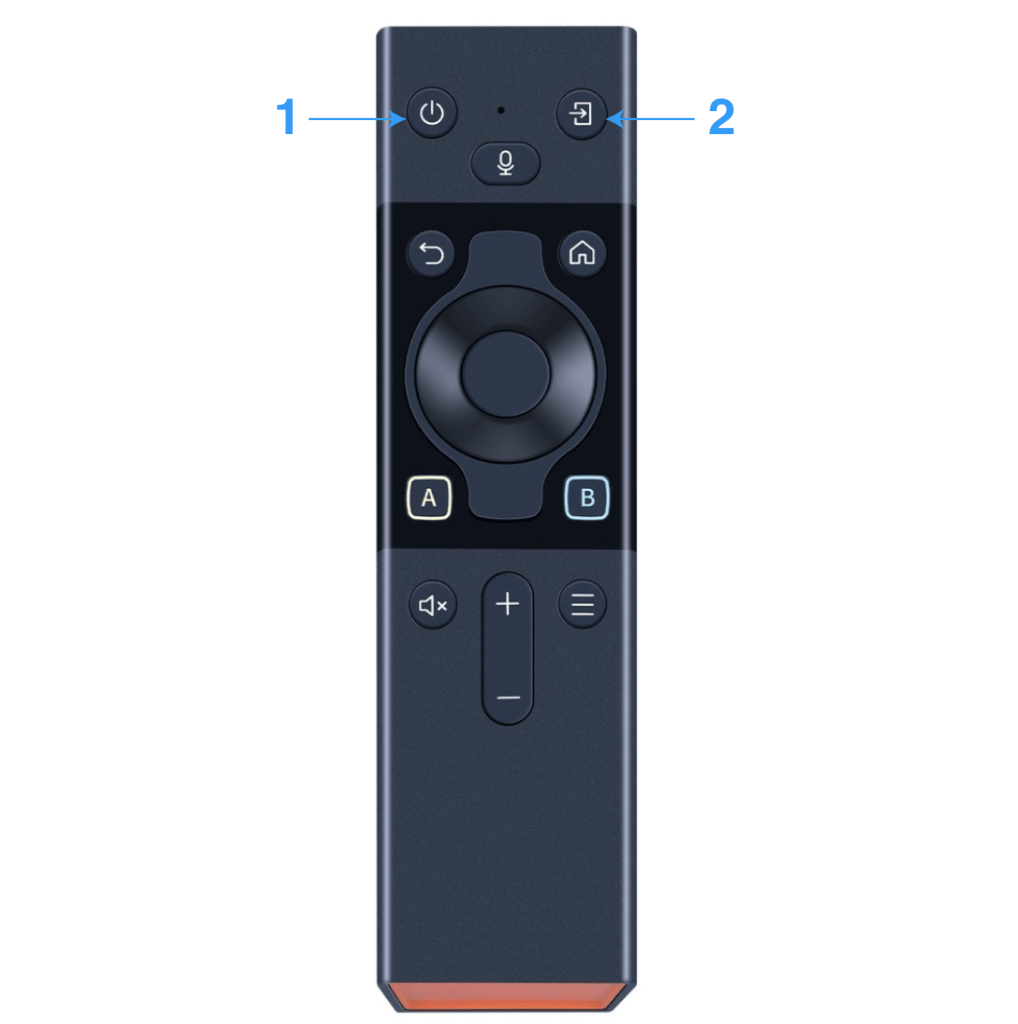
Using the TV:
1- Press “1” button to Power on the TV (see diagram)
2- Press “2” button to Switch input to “Apple TV” (see diagram).
3- On the bottom screen, you’ll see HDMI 1 (Apple TV) highlighted. Press the round middle button to select.
4- After switching, you can continue to use the same TV remote to navigate, or use the dedicated Apple TV remote.

LIVE TV & Movie Library
In AppleTV Menu, open IPTVX for LIVE TV & a huge Movie Library !

Complimentary HBO Subscription included with your stay! Use the GUEST account.
Complimentary Apple TV + Subscription included with your stay! Use the GUEST account and stream away !

Complimentary Apple Music Subscription included with your stay! Use the GUEST account and stream away !

Complimentary Netflix Subscription included with your stay! Use the GUEST account.

Complimentary Hulu Subscription included with your stay! Use the GUEST account.

Complimentary Apple Fitness Subscription included with your stay!
 The Emerald NYC